Q,�};O�$h� 简介:
FRED作为COM组件可以实现与Excel、VB、
Matlab等调用来完成庞大的计算任务或画图,本文的目的是通过运行一个案例来实现与Matlab的相互调用,在此我们需要借助脚本来完成,此脚本为视为通用型脚本。
�PeSTU�R&� 7U�Uu1"|a| 配置:在执行调用之前,我们需要在Matlab命令行窗口输入如下命令:
Vygh|UE��o enableservice('AutomationServer', true)
#fXy4iL �l enableservice('AutomationServer')
�q3|�SZo�N 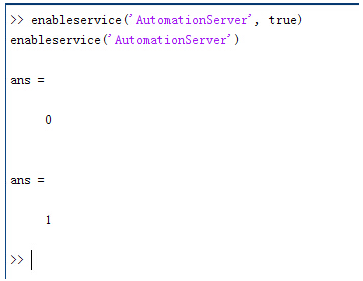 �q�V��v�nl
 结果输出为1,这种操作方式保证了当前的Matlab实体可以用于
通信。
z$VVt�?K�� ?iL�-2I3*� 在winwrp界面,为增加和使用Matlab类型的目录库,我们需要如下步骤:
(Sj<>xg��d 1. 在FRED脚本编辑界面找到参考.
+^.xLT�X`$ 2. 找到Matlab Automation Server Type Library
�:]�LW,Eql 3. 将名字改为MLAPP
5H�(�
]"�C uI3oPP>� $ �VS65SxH�A 在Matlab里面有两种常用的数据发送选项PutWorkspaceData 及PutFullMatrix,PutWorkspaceData适用于存储一般的数据在工作区,并赋予其为变量,PutFullMatrix试用于复数数据。
�N��1U.1~U 图 编辑/参考
�Gbv�bGEG �@2>�c�e2+ OK
z5;#�S= 现在将脚本代码公布如下,此脚本执行如下几个步骤:
7(H�?�3)%0 1. 创建Matlab服务器。
X3y28 %R � 2. 移动探测面对于前一聚焦面的位置。
ler$�HA%F] 3. 在探测面追迹
光线 ��B�T
f��� 4. 在探测面计算
照度 I�,r0�K��] 5. 使用PutWorkspaceData发送照度数据到Matlab
`*i�:��z�' 6. 使用PutFullMatrix发送标量场数据到Matlab中
�!�.O�;S�G 7. 用Matlab画出照度数据
}$�a�*X�Y1 8. 在Matlab计算照度平均值
�<<�9|*T�z 9. 返回数据到FRED中
JZqJ&� ��� %iZ~RTY6 ! 代码分享:
;�h#Q!M&e# ���D��P!8c Option Explicit
B�M��87f:d <�W*6=HZ'� Sub Main
eGW�wPSIp� iZ(�Jw��Y Dim ana As T_ANALYSIS
\8k4v#��wH Dim move As T_OPERATION
I�~-sBMm(w Dim Matlab As MLApp.MLApp
uTy00�`�1� Dim detNode As Long, detSurfNode As Long, anaSurfNode As Long
~b[�5}_L=> Dim raysUsed As Long, nXpx As Long, nYpx As Long
�D8b9�T.[( Dim irrad() As Double, imagData() As Double, reals() As Double, imags() As Double
1b@]�^U�e Dim z As Double, xMin As Double, xMax As Double, yMin As Double, yMax As Double
+5%��ncSJx Dim meanVal As Variant
�?` 2z8uD/ 8C I\NR{x8 Set Matlab = CreateObject("Matlab.Application")
�Z,>�owoP4 )�?(�_vrc< ClearOutputWindow
*QoQ$a�lHH � �&7eN
EA 'Find the node numbers for the entities being used.
I1p{(f��J� detNode = FindFullName("Geometry.Screen")
G}nj
71=�H detSurfNode = FindFullName("Geometry.Screen.Surf 1")
��WqHp�23� anaSurfNode = FindFullName("Analysis Surface(s).Analysis 1")
D$`$4mX@hP �unr`.}A2> 'Load the properties of the analysis surface being used.
2TQ�<XHA�\ LoadAnalysis anaSurfNode, ana
Lfv�RH�?<W g� �c<Y?a- 'Move the detector custom element to the desired z position.
j(c;�r���> z = 50
hK�e�ms3� GetOperation detNode,1,move
A|m0.'/��� move.Type = "Shift"
/5?tXH�" move.val3 = z
u�\f Qa�QV SetOperation detNode,1,move
`�/(9��#�E Print "New screen position, z = " &z
�H�U��el�� ��j<h�0`v 'Update the model and trace rays.
v5W-�f0�Jo EnableTextPrinting (False)
m4R:KjN*� Update
l4^MYwFR{O DeleteRays
_t6��.9CXl TraceCreateDraw
&B$%|�~Y5 EnableTextPrinting (True)
~hT(�uxU/ ua�o#=]�?) 'Calculate the irradiance for rays on the detector surface.
WKq�{g+a�� raysUsed = Irradiance( detSurfNode, -1, ana, irrad )
�ayLIN�p�L Print raysUsed & " rays were included in the irradiance calculation.
f;�b�f�R&v ���X$_z�"t 'When using real number data to send to MATLAB, it is simplest to use PutWorkspaceData.
=3G�gfU5�k Matlab.PutWorkspaceData("irradiance_pwd","base",irrad)
�Q�6�CVMYT MO�|8A18�B 'PutFullMatrix is more useful when actually having complex data such as with
'�Ojxzz*tT 'scalar wavefield, for example. Note that the scalarfield array in MATLAB
=�r~ExW}+� 'is a complex valued array.
&��E-q(�3- raysUsed = ScalarField ( detSurfNode, -1, ana, reals, imags )
��w1+
%+�x Matlab.PutFullMatrix("scalarfield","base", reals, imags )
�2�>��x�EE Print raysUsed & " rays were included in the scalar field calculation."
2hb>6Z;r]K �D<T:U�J�� 'Calculate plot characteristics from the T_ANALYSIS structure. This information is used
��X6r3$�2! 'to customize the plot figure.
m��wF{z.t" xMin = ana.posX+ana.AcellX*(ana.Amin-0.5)
1\�/^X>@W{ xMax = ana.posX+ana.AcellX*(ana.Amax+0.5)
/W�IH#��M yMin = ana.posY+ana.BcellY*(ana.Bmin-0.5)
yY"n:&�T( yMax = ana.posY+ana.BcellY*(ana.Bmax+0.5)
48.4Gw��L7 nXpx = ana.Amax-ana.Amin+1
@\U]� hN?� nYpx = ana.Bmax-ana.Bmin+1
w|-�m*v
�. �>ni0:^�vp 'Plot the data in Matlab with some parameters calculated from the T_ANALYSIS
��i�xB"6O 'structure. Set the axes labels, title, colorbar and plot view.
|[$�TT$�Fb Matlab.Execute( "figure; surf(linspace("&xMin &","&xMax &","&nXpx &"),linspace("& yMin &"," & yMax & "," & nYpx & "),irradiance_pwd, 'EdgeColor', 'None');" )
R���^��yh, Matlab.Execute( "xlabel('X Position (" & GetUnits() & ")')" ) : Matlab.Execute( "ylabel('Y Position (" & GetUnits() & ")')" ) : Matlab.Execute( "zLabel( 'Irradiance' )" )
H4W!�@��"e Matlab.Execute( "title('Detector Irradiance')" )
a�*nCvZ��
Matlab.Execute( "colorbar" )
3O�|2Z~>3� Matlab.Execute( "view(2)" )
�<4�-g2.\ Print ""
`F_R J.g*p Print "Matlab figure plotted..."
5GURf�G�3{ 3E!3kSh|�� 'Have Matlab calculate and return the mean value.
t*� =i8`�8 Matlab.Execute( "irrad = mean(mean(irradiance_pwd));" )
|Pv)��&'B" Matlab.GetWorkspaceData( "irrad", "base", meanVal )
�BoHN�ni�� Print "The mean irradiance value calculated by Matlab is: " & meanVal
7H�?lR~�w� ,]tMZ?�n�8 'Release resources
����!fJy7Y Set Matlab = Nothing
X:Q�R�y9] 4@M�`BH�` End Sub
9�r� �5��( �Fh}GJE�� 最后在Matlab画图如下:
vJ>�o9:(6� ##s�:��Ww 并在工作区保存了数据:
��V�%��voe 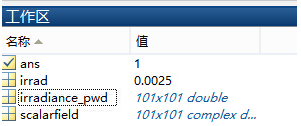 ��3.h����0
 并返回平均值:
!#PA#Q|cO 8k^��1:gt^ 与FRED中计算的照度图对比:
�OZ&SxR%q4 D��4T�(Dce 例:
]<u%jTQREd 5e^z]j1Yv� 此例
系统数据,可按照此数据建立
模型 P9M%B2DQ6f En�Ea�Ub?P 系统数据
�)g ��?'Nz !14�l[k+�\ )Dyyb1��\) 光源数据:
%
�"^CrG� Type: Laser Beam(Gaussian 00 mode)
p\tA&�>3�- Beam size: 5;
)4n]�n:FjN Grid size: 12;
`~��h8�D9G Sample pts: 100;
��C�-H6l6, 相干光;
+a^�0Q
F-7 波长0.5876微米,
m>!a��I�?g 距离原点沿着Z轴负方向25mm。
rE?B9�BF3O CW,|�l��0i 对于执行代码,如果想保存图片,请在开始之前一定要执行如下代码:
��;�33SUgX enableservice('AutomationServer', true)
zRB L�kr�C enableservice('AutomationServer')


