-
UID:317649
-
- 注册时间2020-06-19
- 最后登录2025-12-22
- 在线时间1894小时
-
-
访问TA的空间加好友用道具

|
简介:FRED作为COM组件可以实现与Excel、VB、Matlab等调用来完成庞大的计算任务或画图,本文的目的是通过运行一个案例来实现与Matlab的相互调用,在此我们需要借助脚本来完成,此脚本为视为通用型脚本。 HU $"o6ap� 1.��cP3k�l 配置:在执行调用之前,我们需要在Matlab命令行窗口输入如下命令: �m}uOB��R+ enableservice('AutomationServer', true)
=\o��H=
f enableservice('AutomationServer') Af;P�l|Zh[ 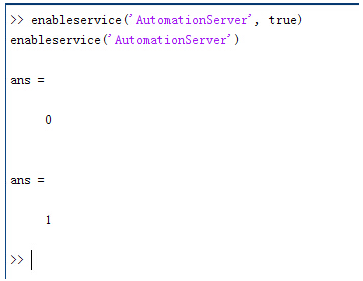 *8Z2zmZtR^ 结果输出为1,这种操作方式保证了当前的Matlab实体可以用于通信。 R ��ZY�=�c >o��u=�}/< 在winwrp界面,为增加和使用Matlab类型的目录库,我们需要如下步骤: g#J aw|�N� 1. 在FRED脚本编辑界面找到参考. m1X7z�UCy 2. 找到Matlab Automation Server Type Library 8%7�%[W�C# 3. 将名字改为MLAPP q��NQ54#�� '�QC�IKCn< \Fz9O-j�b4 在Matlab里面有两种常用的数据发送选项PutWorkspaceData 及PutFullMatrix,PutWorkspaceData适用于存储一般的数据在工作区,并赋予其为变量,PutFullMatrix试用于复数数据。 S/'0cz�DMW 8)��X9abC� *8Z2zmZtR^ 结果输出为1,这种操作方式保证了当前的Matlab实体可以用于通信。 R ��ZY�=�c >o��u=�}/< 在winwrp界面,为增加和使用Matlab类型的目录库,我们需要如下步骤: g#J aw|�N� 1. 在FRED脚本编辑界面找到参考. m1X7z�UCy 2. 找到Matlab Automation Server Type Library 8%7�%[W�C# 3. 将名字改为MLAPP q��NQ54#�� '�QC�IKCn< \Fz9O-j�b4 在Matlab里面有两种常用的数据发送选项PutWorkspaceData 及PutFullMatrix,PutWorkspaceData适用于存储一般的数据在工作区,并赋予其为变量,PutFullMatrix试用于复数数据。 S/'0cz�DMW 8)��X9abC� 图 编辑/参考 {cm?Q\��DT I}4
PB�+yu 现在将脚本代码公布如下,此脚本执行如下几个步骤: MxsLrWx�m� 1. 创建Matlab服务器。 t1Ft�YXv`/ 2. 移动探测面对于前一聚焦面的位置。 �ZRagM'K� 3. 在探测面追迹光线 �2�I-d.��{ 4. 在探测面计算照度 qT$��k�%�( 5. 使用PutWorkspaceData发送照度数据到Matlab d�05xn7%!{ 6. 使用PutFullMatrix发送标量场数据到Matlab中 _��Op�%H)� 7. 用Matlab画出照度数据 OIrm9�D�# 8. 在Matlab计算照度平均值 �$D^\�[^S 9. 返回数据到FRED中 �0^OD���J7 rwF�$a�R>9 代码分享: ,�9�P-<�P� -+*h'zZ[<w Option Explicit �R�d#R}�yA � =_dM@j Sub Main �"I.�6/��9 c{MoeIG)v@ Dim ana As T_ANALYSIS C�?z�S}ob Dim move As T_OPERATION E3uu vQ#|� Dim Matlab As MLApp.MLApp l00i��2w� Dim detNode As Long, detSurfNode As Long, anaSurfNode As Long \=M�L�*Gi* Dim raysUsed As Long, nXpx As Long, nYpx As Long t�?�GH
V3V Dim irrad() As Double, imagData() As Double, reals() As Double, imags() As Double f7=��M�gFi Dim z As Double, xMin As Double, xMax As Double, yMin As Double, yMax As Double pDR�~SxBXr Dim meanVal As Variant v�
Y[s#*+� t�I�uM9D{P Set Matlab = CreateObject("Matlab.Application") hd)J�q'MCS �@{y'_fw�� ClearOutputWindow �/Q1�*Vh4 <0CjEs�AB] 'Find the node numbers for the entities being used. @n�ktD.��� detNode = FindFullName("Geometry.Screen") V:n0�BlZ,B detSurfNode = FindFullName("Geometry.Screen.Surf 1") -��r\jI�O_ anaSurfNode = FindFullName("Analysis Surface(s).Analysis 1") ��{i�D/0q� C`.�YOkp�j 'Load the properties of the analysis surface being used. -b-a2�1,m> LoadAnalysis anaSurfNode, ana ?v2_�7x&�� �[b++bCH�3 'Move the detector custom element to the desired z position. yYCS��-rF> z = 50 V!��W�y[u GetOperation detNode,1,move � FOiwA.:0 move.Type = "Shift" ?H�=YJK$k� move.val3 = z k~tEU��s�v SetOperation detNode,1,move Qte��5E}V` Print "New screen position, z = " &z K�. �
;�ev 4S_f��2P2J 'Update the model and trace rays. ?qjdmB|�w� EnableTextPrinting (False) �]�v
�$�{k Update ,?GwA@~$k: DeleteRays q[$>\Nfg>B TraceCreateDraw ��Z0<�Vs�s EnableTextPrinting (True) #w{�`6�}p E�G{��+S�z 'Calculate the irradiance for rays on the detector surface. %K�Q�1{"� raysUsed = Irradiance( detSurfNode, -1, ana, irrad ) ��vp�u#!(N Print raysUsed & " rays were included in the irradiance calculation. AzU:Dxr>.G &f.5:�u%{b 'When using real number data to send to MATLAB, it is simplest to use PutWorkspaceData. O�/~��T+T% Matlab.PutWorkspaceData("irradiance_pwd","base",irrad) TNu%�_
34 ���[c?0Q3F 'PutFullMatrix is more useful when actually having complex data such as with �l#�0�zHBc 'scalar wavefield, for example. Note that the scalarfield array in MATLAB e�b_.��@.a 'is a complex valued array. ('z=/"��(l raysUsed = ScalarField ( detSurfNode, -1, ana, reals, imags ) Z5��18J46o Matlab.PutFullMatrix("scalarfield","base", reals, imags ) QV[&2&&^<< Print raysUsed & " rays were included in the scalar field calculation." c����~T�{; 6qZ��Q�20h 'Calculate plot characteristics from the T_ANALYSIS structure. This information is used 3p�#�UEH3� 'to customize the plot figure. s\*p��|vc xMin = ana.posX+ana.AcellX*(ana.Amin-0.5) �e9p/y8gC xMax = ana.posX+ana.AcellX*(ana.Amax+0.5) [Me��ivrJ+ yMin = ana.posY+ana.BcellY*(ana.Bmin-0.5) Il�=6�t�� yMax = ana.posY+ana.BcellY*(ana.Bmax+0.5)
eXl�?�f_9 nXpx = ana.Amax-ana.Amin+1 c^|8qv�S�$ nYpx = ana.Bmax-ana.Bmin+1 }u�^�bTR?3 2z�j`
�H9 'Plot the data in Matlab with some parameters calculated from the T_ANALYSIS Hc�a(2 ]T- 'structure. Set the axes labels, title, colorbar and plot view. � <$nPGz)} Matlab.Execute( "figure; surf(linspace("&xMin &","&xMax &","&nXpx &"),linspace("& yMin &"," & yMax & "," & nYpx & "),irradiance_pwd, 'EdgeColor', 'None');" ) Q�
�8�]��X Matlab.Execute( "xlabel('X Position (" & GetUnits() & ")')" ) : Matlab.Execute( "ylabel('Y Position (" & GetUnits() & ")')" ) : Matlab.Execute( "zLabel( 'Irradiance' )" ) :�V�9Q<B^ Matlab.Execute( "title('Detector Irradiance')" ) ]@��U�?hD Matlab.Execute( "colorbar" ) S]H[&o�1�o Matlab.Execute( "view(2)" ) xM_#F��xJb Print "" �2^Xmt��T� Print "Matlab figure plotted..." �L4i�WR/& ckX8e��g!f 'Have Matlab calculate and return the mean value. }�w�f�8y� Matlab.Execute( "irrad = mean(mean(irradiance_pwd));" ) #c|l|Xvq2� Matlab.GetWorkspaceData( "irrad", "base", meanVal ) }�cz�58%�� Print "The mean irradiance value calculated by Matlab is: " & meanVal b�����r\3} i�}T*�|� P 'Release resources �)=)N9CRy Set Matlab = Nothing �tN{0C�/B9 O!Ue0\1Kj0 End Sub Yy�k~!G�/@ ]Jz=.�F sO 最后在Matlab画图如下: C?. ;3 h�� >D=X
Tgqqq 并在工作区保存了数据: RlfI]uCDM !KV�!Tkx h 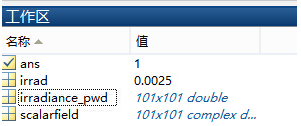 +�HE,Q6-A� +�HE,Q6-A�
�u&y��>� ' 与FRED中计算的照度图对比: �x.g�zsd 2K~�v�`c*4 例: ��$;g*s?F* D� u<�P^CE 此例系统数据,可按照此数据建立模型 y�95
���#t
Z@q1&�}�D! 系统数据 x�EG:�KSH
�H�8HH) ^ � 5+GT�K)D 光源数据: 0Cc�3N�Ndz Type: Laser Beam(Gaussian 00 mode) ��[�]OS p& Beam size: 5; S> Fb'rJ3� Grid size: 12; OBFM70K� Sample pts: 100; R�1*&rj�B� 相干光; N�i�G&Lw*8 波长0.5876微米, s\�.r3U&�6 距离原点沿着Z轴负方向25mm。 ;4+z~7Je]^ �c'$��y_] 对于执行代码,如果想保存图片,请在开始之前一定要执行如下代码: �PR;Bx���y enableservice('AutomationServer', true) +46&� Zb35 enableservice('AutomationServer') ��DI{��Qs[
|


