-
UID:317649
-
- 注册时间2020-06-19
- 最后登录2025-12-12
- 在线时间1894小时
-
-
访问TA的空间加好友用道具

|
简介:FRED作为COM组件可以实现与Excel、VB、Matlab等调用来完成庞大的计算任务或画图,本文的目的是通过运行一个案例来实现与Matlab的相互调用,在此我们需要借助脚本来完成,此脚本为视为通用型脚本。 &,#VhT��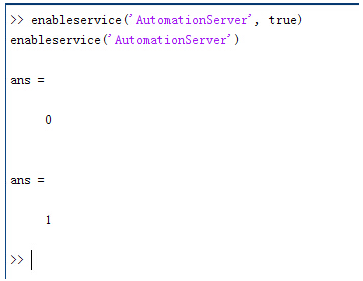 d�~n+Ds)%F 结果输出为1,这种操作方式保证了当前的Matlab实体可以用于通信。 ;�lK�2��] aTPpE9�Pa& 在winwrp界面,为增加和使用Matlab类型的目录库,我们需要如下步骤: ;ndg,05�_� 1. 在FRED脚本编辑界面找到参考. Q��;Oc#
�u 2. 找到Matlab Automation Server Type Library �\t1vYIY]T 3. 将名字改为MLAPP P(Lwpa,S�
i�lNm\�fQ. J=Jw"?�� f 在Matlab里面有两种常用的数据发送选项PutWorkspaceData 及PutFullMatrix,PutWorkspaceData适用于存储一般的数据在工作区,并赋予其为变量,PutFullMatrix试用于复数数据。 �k4`v(au^� <f��yv^e�� d�~n+Ds)%F 结果输出为1,这种操作方式保证了当前的Matlab实体可以用于通信。 ;�lK�2��] aTPpE9�Pa& 在winwrp界面,为增加和使用Matlab类型的目录库,我们需要如下步骤: ;ndg,05�_� 1. 在FRED脚本编辑界面找到参考. Q��;Oc#
�u 2. 找到Matlab Automation Server Type Library �\t1vYIY]T 3. 将名字改为MLAPP P(Lwpa,S�
i�lNm\�fQ. J=Jw"?�� f 在Matlab里面有两种常用的数据发送选项PutWorkspaceData 及PutFullMatrix,PutWorkspaceData适用于存储一般的数据在工作区,并赋予其为变量,PutFullMatrix试用于复数数据。 �k4`v(au^� <f��yv^e�� 图 编辑/参考 �jRBx�7|ON A#p@`�|H#B 现在将脚本代码公布如下,此脚本执行如下几个步骤: Dg]��i}�;� 1. 创建Matlab服务器。 IMrB!bo�r 2. 移动探测面对于前一聚焦面的位置。 �69L s"��e 3. 在探测面追迹光线 7/~"�\nN:/ 4. 在探测面计算照度 .a^/���r'? 5. 使用PutWorkspaceData发送照度数据到Matlab '�DIE#�l`� 6. 使用PutFullMatrix发送标量场数据到Matlab中 �L,:U _\HQ 7. 用Matlab画出照度数据 w}�E?FEe.� 8. 在Matlab计算照度平均值 [Z[)hU�XE? 9. 返回数据到FRED中 �5G2��u(hx wb��pxJtJB 代码分享: �sS0ps�w�1 JD>�!3>S)? Option Explicit q!7\`>.2:{ /
)EB~|4'] Sub Main Ul�i�gr_c? ]>:>":��<: Dim ana As T_ANALYSIS .Kv@p �jOr Dim move As T_OPERATION �h&Sl8$jVp Dim Matlab As MLApp.MLApp tF����;aB* Dim detNode As Long, detSurfNode As Long, anaSurfNode As Long
bhg�h
]�{ Dim raysUsed As Long, nXpx As Long, nYpx As Long ;Joo!�CXHO Dim irrad() As Double, imagData() As Double, reals() As Double, imags() As Double D2hvf�^g'* Dim z As Double, xMin As Double, xMax As Double, yMin As Double, yMax As Double !�7w-?1?D� Dim meanVal As Variant a:8@:d1T K s}�A�]��lY Set Matlab = CreateObject("Matlab.Application") w(��@`�g/b x�0��#+yP� ClearOutputWindow ?@u�
&3/�&
zzxU9m�~" 'Find the node numbers for the entities being used. �LQ�S*/�s0 detNode = FindFullName("Geometry.Screen") WRnUF�[y+) detSurfNode = FindFullName("Geometry.Screen.Surf 1") �j�Xdn4m/O anaSurfNode = FindFullName("Analysis Surface(s).Analysis 1") 6v��1j�*' 4g�ZN~_AI< 'Load the properties of the analysis surface being used. $X{& K�LM[ LoadAnalysis anaSurfNode, ana FqiK}K.~�/ 1H�Z��exV� 'Move the detector custom element to the desired z position. Z86[sQB�g z = 50 ?�oF�@q :W GetOperation detNode,1,move NT n�n!k� move.Type = "Shift" gf!j�|O;� move.val3 = z ''(T3;^ +
SetOperation detNode,1,move H#ihU3q��� Print "New screen position, z = " &z CUtk4;^�y# Hg�MDw/�D( 'Update the model and trace rays. �d,>l�;��l EnableTextPrinting (False) \��GkcK$�Y Update U9��If%�0P DeleteRays dzcPSbbpt� TraceCreateDraw $�@<\$I2s EnableTextPrinting (True) 9*x9sfCv9 =*'`�\}];" 'Calculate the irradiance for rays on the detector surface. abK/!m[�q raysUsed = Irradiance( detSurfNode, -1, ana, irrad ) ePF��9Vzq� Print raysUsed & " rays were included in the irradiance calculation. q�80?C.�,` \0:l�9;^4 'When using real number data to send to MATLAB, it is simplest to use PutWorkspaceData. ��g�"!B
�| Matlab.PutWorkspaceData("irradiance_pwd","base",irrad) yf$7<g�wX� 5�9)�PJ0�E 'PutFullMatrix is more useful when actually having complex data such as with %URy�GS�]* 'scalar wavefield, for example. Note that the scalarfield array in MATLAB 5n"'�M&Ce 'is a complex valued array. o�i!E
v_�h raysUsed = ScalarField ( detSurfNode, -1, ana, reals, imags ) BvYJ!Vj�� Matlab.PutFullMatrix("scalarfield","base", reals, imags )
vu1�:�8�j Print raysUsed & " rays were included in the scalar field calculation." �C��R�_A{( `��,|7X]%b 'Calculate plot characteristics from the T_ANALYSIS structure. This information is used ���@W�v�*` 'to customize the plot figure. n�.��T
[�a xMin = ana.posX+ana.AcellX*(ana.Amin-0.5)
�aR�3W9 xMax = ana.posX+ana.AcellX*(ana.Amax+0.5) �}��b{��N[ yMin = ana.posY+ana.BcellY*(ana.Bmin-0.5) t4Z�.b �5g yMax = ana.posY+ana.BcellY*(ana.Bmax+0.5) @U9ov� >�E nXpx = ana.Amax-ana.Amin+1 �?iq:Gf��� nYpx = ana.Bmax-ana.Bmin+1 y@(U�6ZOyx 4u;W1=+Vn� 'Plot the data in Matlab with some parameters calculated from the T_ANALYSIS Vw,dHIe(3� 'structure. Set the axes labels, title, colorbar and plot view.
AK�Hi$Bk� Matlab.Execute( "figure; surf(linspace("&xMin &","&xMax &","&nXpx &"),linspace("& yMin &"," & yMax & "," & nYpx & "),irradiance_pwd, 'EdgeColor', 'None');" ) )QK�ZI))G0 Matlab.Execute( "xlabel('X Position (" & GetUnits() & ")')" ) : Matlab.Execute( "ylabel('Y Position (" & GetUnits() & ")')" ) : Matlab.Execute( "zLabel( 'Irradiance' )" ) tV �T(�!&( Matlab.Execute( "title('Detector Irradiance')" ) /�1^%�32c� Matlab.Execute( "colorbar" ) �3}s�d%vCK Matlab.Execute( "view(2)" ) Y`_6Ny="�� Print "" [b��ZXz�V( Print "Matlab figure plotted..." F��Pu,sz8� _�E�1:3�N| 'Have Matlab calculate and return the mean value. u�=4tW:W,� Matlab.Execute( "irrad = mean(mean(irradiance_pwd));" ) m*�(8I=]�q Matlab.GetWorkspaceData( "irrad", "base", meanVal ) p�_}Ot�S�; Print "The mean irradiance value calculated by Matlab is: " & meanVal wW�H5T�}�\ T�+gqu
&9R 'Release resources 8J�@RE�P�4 Set Matlab = Nothing �jfI|( �P FkRr�W^?5G End Sub .<tb*6r�X> X0�9&��S4� 最后在Matlab画图如下: Iz � �,C!c 1�c\$z�iB 并在工作区保存了数据: n0cqM}P@;! {>s�yZZ,h� 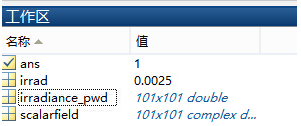 /Jo*O=�Lpo /Jo*O=�Lpo
�V�kUMMq{� 与FRED中计算的照度图对比: 7�H=/FT?e] @�Gl=��1� 例: aiz_6@Qfz* b&0q�%tC�K 此例系统数据,可按照此数据建立模型 &OsJnkY<�<
0��(64}T)� 系统数据 RU�@`+6�j+
oo<,h�Ov�� /9i2@#J}W1 光源数据: �2�r\�f!m' Type: Laser Beam(Gaussian 00 mode) `Up�3p�24� Beam size: 5; 2'N%KKmJL Grid size: 12; aLG6yV�tu Sample pts: 100; $�2\�OB�c= 相干光; +$�P0&�YaQ 波长0.5876微米, h19c�*,0z! 距离原点沿着Z轴负方向25mm。 \]GBd~i�< Fd�0��R?d 对于执行代码,如果想保存图片,请在开始之前一定要执行如下代码: ��Rt���N5\ enableservice('AutomationServer', true) xMU�4Av[{� enableservice('AutomationServer') E�QMn'��> E�QMn'��>
|


